
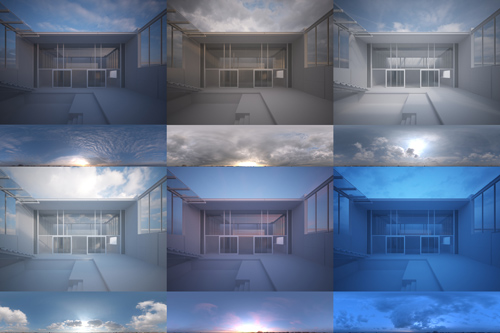
Thought I should do a quick tutorial on how I use these HDRi Skydomes I'm selling. Note that this is just one of many possible workflows, and there are probably lots of tricks I'm missing and even things I do completely wrong. I should also say that I work mostly with still images, not animations.
1. Here is a typical architectural scene. It is a model I made of Waro Kishi's Fukaya house in Japan that never really went anywhere.

2. I use a gamma 2.2 workflow together with reinhard color mapping, so not strictly LWF but shares some of the advantages. I don't want this to turn into a LWF tutorial or discussion, but this post on cgpov.com pretty much sums up how I feel a gamma corrected workflow helps us as visualisation artists.

The reinhard color mapping helps to control burnt out (overexposed) areas. Screenshot of my color mapping set up: The burn value of the reinhard color mapping typically ranges from .75 for an exterior to 0.05 for an interior. You need to experiment with the value until you gain control over the burnt out areas. Here is an example with a camera pointing at the HDR sky:

For the final render, I use the Vray Frame Buffer, and add a slight s-curve to the output to compensate for the lack of contrast that the gamma corrected workflow introduces:

3. Add a vray dome light and load the exr/hdr using the max bitmap loader. Set the mapping type to environment/spherical. If you are using .hdr files, you can use the vrayHDRi loader instead. It makes no difference whether you use the bitmap loader or the vrayHDRi loader, the vrayHDRi adds a bit more control in that you can control the render multiplier independently from the viewport multplier. Set the output of the .exr to 1 and the vraylight multiplier to 1. If your hdr/exr has no alpha channel it seems you can save quite a bit of memory while rendering (approx 200mb in my case) if you load the exr/hdr as realpixel float rgb rather than the rgba option. (NOTE: ONLY applicable to 3dsmax 2009)
EDIT: Please don't pay too much attention to the 3dsmax 2009 realpixel hdri loading option, it just saved a little bit of memory which is why I mentioned it. I now use a later version of max and no longer have this option either.

4. To rotate the HDR you need to enter a U offset value from 0-1, so to rotate 180 degrees with would enter 0.5, 270 degrees 0.75 etc.
5. Add a vrayphysicalcamera, and set the aperture and shutter speed to something that would work for a typical outdoor scene, like F4, 1/200th & ISO 100. Remember that you are in effect using a completely manual camera, there is no 'P' or automatic mode so you need to experiment with different exposures until you get a good result.

6. Hit render and see what you get. If it looks too dark/bright I tend to adjust the bitmap's output rather than the vraylight multiplier, so that I can have a couple of ready setup HDRi's ready to drag and drop onto the dome light. In the examples below I use an output value of 1.5.