
Vray Edge Fillet Tutorial

render_4

This is a quick tutorial to show how I add extra details to the edges of surfaces. In this scene, I wanted to make the hard edges of the concrete appear rougher and less uniform. Vray comes with a map called a vrayedgestex map that you would normally use to make wireframe materials (eg hidden line renders). It can also be used as a bump map to give the illusion of rounded edges.

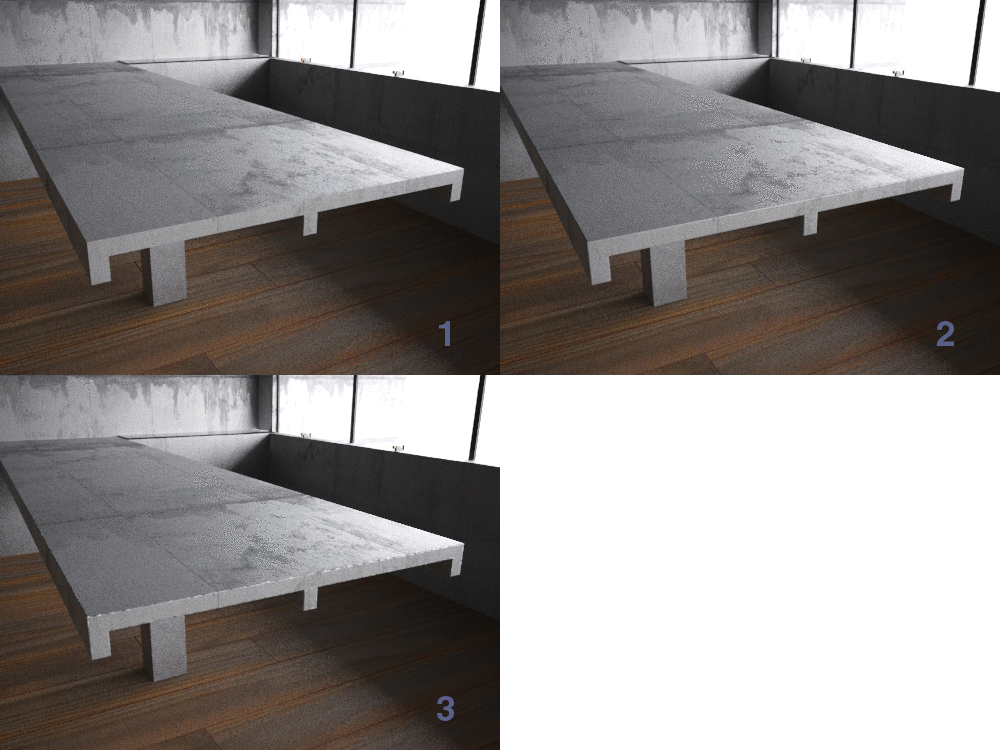
In the 3 examples below, I have applied a vrayedgestex (red for clarity) to the diffuse channel of a grey material, the second is a black and white noise map, and in the third I have combined the two by using a vraycomptex map. The vraycomptex map is set to multiply which gives the effect of breaking up the otherwise smooth red line around all the edges of the table. Setting the vraycomptex to multiply is like blending modes in Photoshop, and about as easy to understand - I recommend experimenting with the various modes till you get a feeling for what each do.

process1

animrendered

In the animated gif, 1 is a render without any bump map, 2 is with just vrayedgestex and 3 is the final result.
material

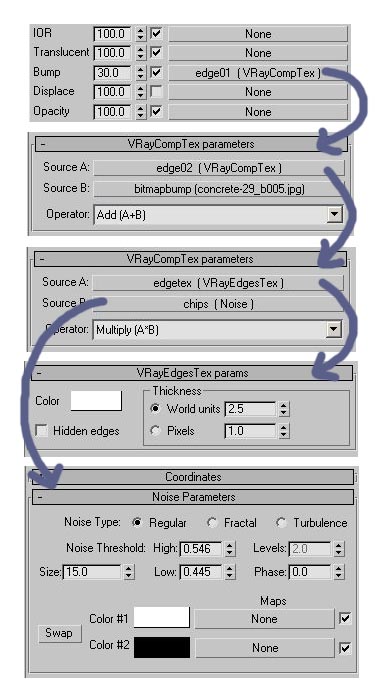
So in the material editor, at the top I have a vraycomptex in the bump slot called ‘edge01′ which adds together the next vraycomptex ‘edge02′ and the standard bitmap bump jpg for the concrete material. ‘edge02′ is the one that multiplies together the vrayedgestex map and the noise map. You should set the vrayedgestex to white, and change it to world units. I work in millimeters so 2.5 was about right. You can then play about with different types of noise maps, but the settings I have above worked well for concrete.

Tags: , , , ,

Comments

  1. Oh, how could I miss your blog :) Subscribing to feed.

    Nice vrayedges workflow, thanks for sharing.

  2. hey, thanks for a great tutorial! that is also a really beautiful render in its own rights!

  3. really usefull tut!! a great/quick method to take smooth edges, thanks you very much for sharing ;)

    greets

  4. Paulo Mendes De Rocha?

  5. Apri3d

    Hi really interesting tut. I found it usefull for adding realism to my renders. A little payback to your effort, Tip: convert object to editable mesh, and make edges visibility on or off as needed ;)

    Thanks!

  6. thanks, thats a great tip!

  7. Oh! It’s really usefull tut!
    And your blog too!
    10x

  8. My mind is not in state now, XD Would you post how to achieve only the fillet effect? Please =)

  9. Hi diegoev, just put a vrayedgestex into the bump slot of your vraymaterial, then adjust the thickness in world units to suit your scale/scene

  10. Hi, Thanks for this.

    saves doing a chamfer in geometry.

    though, how can i use the bump slot to do the fillet and a wood grain bump or tile bump?

  11. Hi,

    Really really very useful tutorial.

    Many Many thanks for all your help.

    from now i will regular see this blog.

    Thanks

  12. Very nice tutoriall!!!

  13. it seems like this trick doesnt work for geometry that has more than 1 face….

    if i make a box with 3×3x3 segments, all the edges will get a bump effect, and i only want the border edges to get bumpped….

    i m wondering shound i use vrayCompTex with vrayDirt instead of noise, since vrayDirt only affect the border edges if i tweak the paramters enough…

    great tip tho

  14. I haven’t tested it, but maybe it can be controlled through edge visibility or smoothing or something?

Leave a Comment